

Most Playwright suites are already parallel. The leftover serial pockets are usually there because two tests share a user, a feature flag, or a third-party sandbox that cannot take two writers at once.
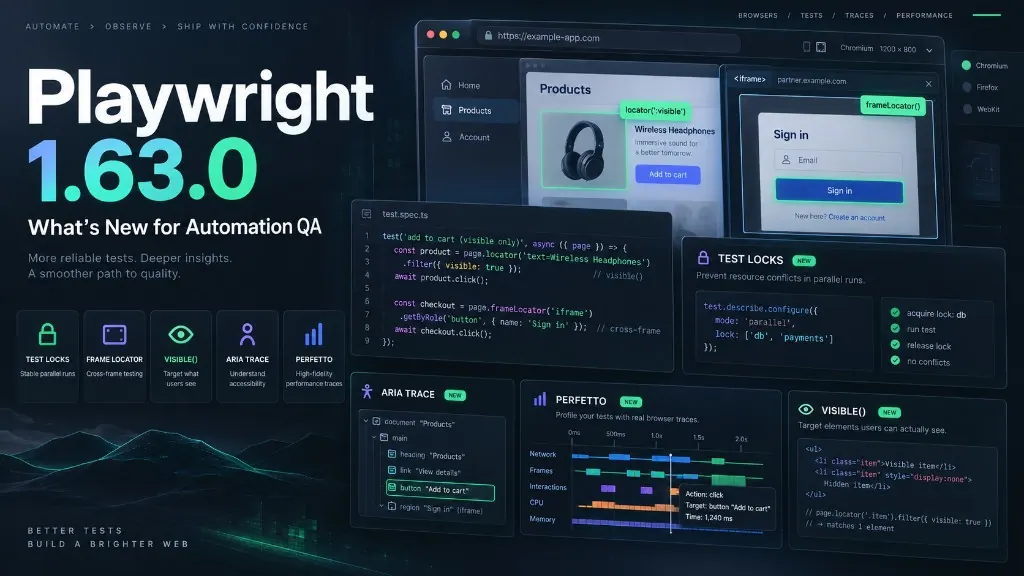
Playwright 1.63 adds named test locks for that case. It also lets locators search across frames without naming the iframe, filters to visible elements with locator.visible(), and records ARIA plus screen snapshots in traces. None of that rewrites how you write a test. It changes how a large run stays parallel, stays locatable, and stays diagnosable.
This is the next version review after Playwright 1.62.1. Isolated retries still explain interference after the fact. Locks stop a known shared resource from colliding in the first place.
npm install -D @playwright/test@1.63.0
npx playwright install
Named locks beat a serial suite
A lock is a name. Tests that share the name never run at the same time, across files, workers, and projects. Everything else keeps running in parallel.
import { test } from '@playwright/test';

test(
  'update user settings',
  { lock: 'user-settings' },
  async ({ page }) => {
    // never runs with another holder of 'user-settings'
  }
);
A test can wait for several names at once. Playwright acquires all of them before the test starts and releases them when it finishes, so you do not get a partial hold.
test(
  'reset the database',
  { lock: ['database', 'external-api'] },
  async () => {
    // waits until both names are free
  }
);
test.describe() accepts the same option and applies it to every test in the group. That is the right shape for a payments sandbox or a shared admin account that several specs touch.
I would reach for a lock when the shared thing is real and cannot be cloned: one Stripe test account, one global feature flag, one environment-wide cleanup. I would not use it as a cheaper isolation strategy. If the test can create its own user, that is still the better design.
Where a lock is the wrong tool
Locks do not order tests. Serial mode still exists for “this one must run after that one, and skip the rest on failure.” Mixing the two without reading the scheduling note will surprise you.
In default and serial modes, tests in a file run together in order. A lock declared on any test in that file is held for the whole file. If settings.spec.ts has one locked test and ten independent ones, those ten wait behind the lock even though they do not need it. Split the locked case into its own file, or turn on parallel mode for that file so the lock is held only around the test that asked for it.
A lock also does not replace isolated retries. Isolated retries tell you a failure was load-sensitive. A named lock is for a resource you already know is shared. Use the lock when you can name the collision. Use isolated retries when you cannot.
Find the button without naming the iframe
Payment widgets, SSO, and support chats still ship as iframes. The old pattern was: locate the frame, then search inside it.
const payment = page.frameLocator(
  'iframe[data-testid="payment-frame"]'
);

await payment.getByRole('button', { name: 'Pay' }).click();
In 1.63, page.frameLocator() and frame.frameLocator() can be called with no selector. Playwright searches any frame in the subtree.
await page
  .frameLocator()
  .getByRole('button', { name: 'Pay' })
  .click();
The rest of the locator still resolves inside a single frame. If the same role and name exist in two frames, Playwright throws instead of clicking an arbitrary match. That is the correct failure.
Keep an explicit frame locator when the frame itself is the requirement: “this button must be inside the PSP iframe, not on the merchant page.” Use the selector-less form when the test cares about the control and the iframe wrapper keeps changing class names.
Filter what the user can see
locator.visible() returns a locator that matches only visible elements. It is the recommended replacement for the :visible CSS pseudo-class.
await page.locator('button').visible().click();This is a filter, not an assertion. Hidden twins of a button are a common source of strict-mode errors: a decorative duplicate in a closed drawer, a display:none template, a mobile copy of a desktop CTA.
// selection: ignore the hidden duplicate
await page.getByRole('button', { name: 'Add to cart' }).visible().click();

// assertion: visibility is the requirement
await expect(
  page.getByRole('button', { name: 'Submit' })
).toBeVisible();
I would switch new and edited locators to .visible() and leave a working :visible locator alone until that line is already changing. A wholesale rewrite of a stable suite is not an upgrade.
Better traces, then a run-level timeline
Three diagnostics landed together. They answer different questions.
Steps that reporters can parse
test.step() now takes subtitle and params. Keep the title stable. Put the variable context next to it.
await test.step(
  'Login',
  async () => {
    // login flow
  },
  {
    subtitle: 'as admin',
    params: { user: 'admin', environment: 'staging' },
  }
);
Playwright’s own API steps already expose the target locator as a subtitle, for example Click with getByRole('button'). Custom steps should follow that model. Page objects and fixtures benefit first: one title, many call sites, structured params in the HTML report.
Do not put passwords, tokens, or session cookies in params. Those values show up in traces and CI artifacts.
ARIA and screen snapshots
Trace config can now choose what to capture on every action:
import { defineConfig } from '@playwright/test';

export default defineConfig({
  use: {
    trace: {
      mode: 'on-first-retry',
      snapshots: {
        dom: true,
        aria: true,
        screen: true,
      },
    },
  },
});
Trace Viewer gains a Display Aria mode: screenshot on one side, accessibility tree on the other. Hover a node and the matching UI region highlights. That is the right place to debug a getByRole() miss, a duplicated accessible name, or a control that looks fine and is not in the tree.
It is not an accessibility audit. It is a locator debugger that happens to speak ARIA. locator.ariaSnapshotJSON() and page.ariaSnapshotJSON() return the same tree as JSON when you want a reporter or a script to consume it instead of YAML.
Perfetto for the whole run
Trace Viewer explains one test. The new perfetto reporter explains the suite.
npx playwright test --add-reporter=perfetto--add-reporter appends a reporter on top of playwright.config.ts. --reporter still replaces the configured list, which is why the new flag exists: turn Perfetto on for one CI job without editing the config.
Open the file in Perfetto UI or chrome://tracing. You get a lane per worker. Slow beforeAll hooks, fat fixtures, and uneven file distribution show up as idle gaps. That is the view I would collect after a suite crosses a few thousand tests and “it just feels slower” stops being a useful report.
If you already dump HTTP history with playwright-api-logger, Perfetto is the complementary picture: not what each call did, but where the workers spent the wall clock.
What I would adopt first
1. Split locked tests out of serial files. Walk anything still on mode: 'serial' or workers: 1 because of a shared account. Some of those files can go back to parallel with a named lock on the two or three tests that actually need it. Watch the file-scoped hold: if the locked test sits next to independent tests in default mode, move it.
2. Use .visible() on new locators. Prefer it over :visible. Do not churn the rest of the repo.
3. Drop brittle iframe selectors where the frame is not the assertion. Keep explicit frameLocator('iframe#psp') when the boundary matters.
4. Turn on ARIA snapshots for retries, and Perfetto for one weekly CI job. Structured step params belong in shared helpers first, not in every one-off spec.
Typed request.get<User>() is compile-time only. It will not catch a field the API dropped. Keep a schema check if the contract is the point of the test.
Upgrade notes
A few items are easy to miss in a changelog skim:
- Ubuntu 20.04 is no longer supported.
@playwright/experimental-ct-react,experimental-ct-react17, andexperimental-ct-vuewill not get further updates. Move to the stories model from 1.62.npx playwright install --no-removekeeps browsers from other Playwright versions on the machine.httpCredentialsaccepts an array and picks the first entry matching the request origin.storageState({ opfs: true })can persist Origin Private File System data. Relevant for PWAs and offline editors, not for a typical cookie session.- Bundled browsers: Chromium 153, Firefox 155, WebKit 26.6.
Then run Chromium, Firefox, and WebKit, plus auth setup, visual snapshots, custom reporters, and the CI image. A runner bump this size is also a browser bump.
The question this release is answering
Test locks are the feature I would upgrade for. They let a suite stay parallel without pretending every test owns its data.
The rest of 1.63 points the same way. Cross-frame locators drop a selector you did not care about. .visible() names a filter that used to hide in CSS. Step params and ARIA traces make reports and retries readable. Perfetto shows where workers sat idle.
Playwright is no longer only asking whether you can click the button. It is asking whether a few thousand of those clicks can run, fail, and explain themselves without you turning the whole grid serial.
Technical details checked against the Playwright 1.63 release notes. External references kept to the official docs.